Service Architecture
The Dataset Profiler service is designed with a microservice architecture that enables efficient and scalable dataset profiling. This document outlines the key components and their interactions.
High-Level Architecture
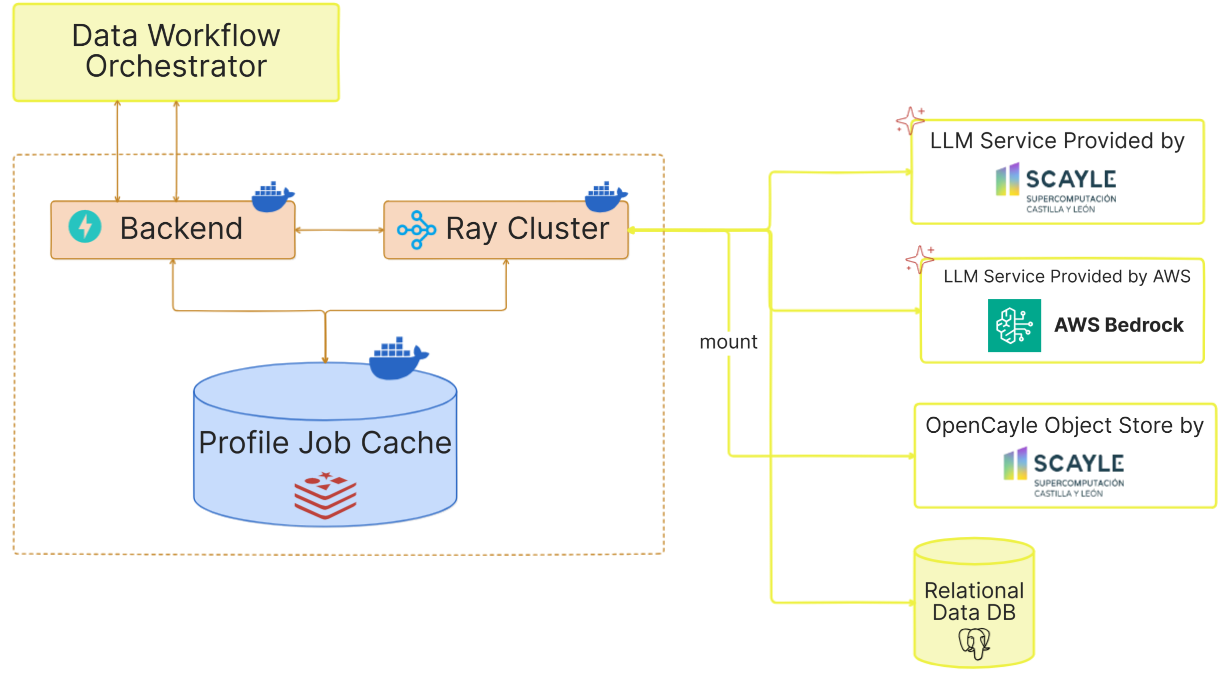
The following diagram illustrates the high-level architecture of the Dataset Profiler service:
Component Details
API Layer
The Backend layer is built using FastAPI and provides the endpoints documented in API Documentation.
Concerning profiling specifically the following endpoints are used:
/profiler/trigger_profile: Submit a new profiling job/profiler/runner_status/{profile_job_id}: Check the status of the Ray task/profiler/job_status/{profile_job_id}: Check the status of the profiling job/profiler/profile/{profile_job_id}: Retrieve the generated profile/profiler/cdd_profile_path/{dataset_id}: Retrieve the CDD profile path by dataset ID/profiler/clean_up: Clean up resources for a completed job
Health and readiness are exposed separately under the /monitoring prefix (/monitoring/ready, /monitoring/health-check) plus the root liveness endpoint /.
Job Manager
The Job Manager is responsible for:
- Creating unique job IDs for profiling requests
- Submitting jobs to the Ray cluster
- Tracking job status (submitting, starting, light profile ready, heavy profiles ready)
- Storing and retrieving job results
Profiling Engine
The Profiling Engine performs the actual dataset analysis and consists of:
- Dataset Specification Parser: Parses and validates input specifications
- Distribution Extractor: Identifies and extracts metadata about dataset files
- Record Set Extractor: Analyzes the structure and content of datasets
- Document Describer: LLM-extracted keywords and summary for PDF and text documents — see Document Keywords & Summaries
- JSON Profiler: finds the records in JSON and JSON Lines files and profiles each JSONPath as a field — see JSON Profiling
- Data Quality Detector (opt-in): LLM-assisted error detection for tabular record sets — see Data Quality
- Profile Generator: Assembles the extracted information into standardized profiles
Supported Data Types
The service can profile the following types of data:
- Tabular Data: CSV files, Excel spreadsheets
- Semi-structured Data: JSON and JSON Lines files, at the dataset root or inside a folder — see JSON Profiling
- Databases: SQL databases with table structures
- Documents: Text files, PDF documents — profiled when they sit inside a folder of the dataset (a
cr:FileSet); see Document Keywords & Summaries - File Collections: Sets of related files
Files of any other type — audio, video, archives — are listed but not opened. They appear in the
profile's distribution with their path, size and a MIME type guessed from the extension, and a
folder holding only such files is still listed as a cr:FileSet, so the profile stays a complete
inventory of the dataset. What they never get is a recordSet: no content is read, and no
statistics, semantic types or data quality are reported for them.
Character Encoding
Uploaded files carry no reliable encoding declaration, so the profiler resolves one per file before reading it. The candidates are tried in order and the first that decodes the file in full wins:
| Order | Encoding | Why |
|---|---|---|
| 1 | utf-8-sig |
Plain UTF-8, but strips a leading byte-order mark that would otherwise appear as  welded onto the first column name |
| 2 | cp1252 |
Most files that fail UTF-8 are Windows/Excel exports. Agrees with Latin-1 except across 0x80–0x9F, where it yields the intended punctuation (en-dashes, curly quotes) instead of unusable control characters |
| 3 | ISO-8859-1 |
Maps every byte 0x00–0xFF, so it never raises. The last resort, and the reason profiling cannot fail on an undecodable file |
The check decodes the whole file rather than sampling a prefix. A prefix is cheaper but can be wrong in the worst way: a file that is ASCII for its first few megabytes and Windows-encoded afterwards would be declared UTF-8, and the decode would then fail part-way through a profiling pass. Decoding is incremental, so memory stays flat regardless of file size, and the scan costs a fraction of the pandas passes that follow.
The resolved encoding is reused by every reader for that file — delimiter sniffing, the header read, both streaming passes, the semantic-type sample, and the data quality detection script — so a file is never read two different ways.
JSON and JSON Lines files use the same resolution. The streaming JSON parser reads UTF-8 only, so a leading byte-order mark is skipped and a file in another encoding is re-encoded to UTF-8 on the fly, without being loaded whole.
Text and PDF record sets detect their own encoding separately, via chardet.
Distributed Computing Layer
The service uses Ray for distributed computing, which enables:
- Parallel processing of multiple profiling processes
- Efficient resource utilization
- Fault tolerance and automatic recovery
Profile Job Cache
The profile job cache handles:
- Job status monitoring
- The generated profiles
Both are stored into Redis and are retrievable through the job ID.
Data Flow
- Client submits a profiling request with dataset specifications
- API validates the request and creates a job
- Job Manager submits the job to the Ray cluster
- Profiling Engine extracts distributions (light profile)
- Light profile is stored and made available
- If requested, Profiling Engine extracts record sets (heavy profile)
- Complete profile is stored and made available to the client